Thursday, 1 September 2011

What is EMC Clariion MirrorView ?


MirrorView also known as MirrorView/S, because of its synchronous nature is a storage-based application that resides on the CLARiiON. It provides an online, host independent, mirrored data storage and protection solution that duplicates production site data (primary) to one or two secondary sites (secondary/secondaries) in a campus environment. The mirroring is synchronous, meaning that every time a host writes to the primary array, the secondary array mirrors the write before an acknowledgement is returned to the host. MirrorView ensures that there is an exact byte-for-byte copy at both the local CLARiiON and the remote CLARiiON. Since MirrorView is storage-based software, no host CPU cycles are used. This allows MirrorView to operate in the background, transparent to any hosts or applications, and to be able to provide the same information protection services to all server platforms and operating system that connect to the CLARiiON.

Salient Features:-

1) Independent of server, operating system, network, applications, and database.
2) Centralized, simplified management via EMC Navisphere.
3) Concurrent information access when used with SnapView.
4) Synchronous Remote Mirroring Between Two CLARiiON Systems.
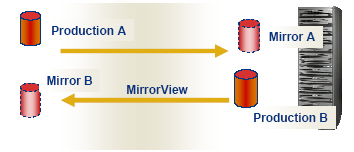


MirrorView is fully integrated with EMC SnapView, the CLARiiON host-based software that creates consistent point-in-time copies for remote location snapshots. For simplified management and staff training, both MirrorView and SnapView are managed from within CLARiiON’s Navisphere Management software. That means that the same user-friendly Windows-like interface is common among all the CLARiiON software products, which minimizes learning curves and reduces training costs.The MirrorView software must be loaded on both arrays, regardless of whether the customer wants to implement bi-directional mirroring or not. 

If only synchronous mirroring is required, then only MirrorView will need to be active on the local and remote CLARiiON(s). The secondary LUN must be the same size, though not necessarily the same RAID type, as the primary LUN. The Host cannot attach to an active secondary LUN as long as it is configured as a secondary mirror, unless you promote the secondary mirror to be the primary mirror (as seen in a disaster recovery scenario), or if you remove the secondary LUN as a secondary copy. Once this is done, a full resynchronization to the LUN would have to be performed.

Know EMC Clariion Navisphere Event Monitor.


EMC Clariion Event Monitor is tightly integrated with Navisphere Manager version 6.x. .Event Monitor is designed to run in the background, without permanent supervision by the operator. It runs on one or more hosts or SPs and watch over the storage systems. It offers versatile reporting of errors in a number of ways. Although defaults exist for which errors and event classes will be reported, the user may modify those defaults at will. The user may also choose the notification method – this ranges from dial-home/dial-back to theEMC Support Center, to the use of SNMP traps for notification. A custom option exists, so that the user may use an existing utility, or a custom-crafted one, to report the errors.Navisphere Integrator allows Event Monitor to integrate with industry-leading Enterprise Management Platform software, such as CA-Unicenter. The reporting of events is controlled by a Navisphere agent – the host agent on supported platforms, or the SP agent on FC4700 and CX-series storage systems. 

Salient Features :-

1) The Event Monitor GUI is integrated with Manager.
2) Event Monitor is part of the Navisphere Agent.
3) Monitors for user-configurable events.
4) Reports those events in user-configurable ways.
5) May launch other utilities/applications.
6) Can send SNMP traps to Enterprise Management Platforms.

What is EMC Clariion CLARalert ?


CLARalert software monitors your storage system’s operation for error events and automatically notifies your service provider of error events. You install CLARalert using the InstallAnywhere wizard, which guides you through the process and, if required, provides context-sensitive help on how to perform a particular step. CLARalert does not support upgrades to distributed (non-centralized) monitoring environments. If you have an existing CLARalert configuration that uses a distributed monitoring environment, the upgrade will create a centralized monitoring environment.The existing distributed monitoring environment and the newly created centralized monitoring environment may result in double notifications to your service provider. Your existing distributed monitoring environment will not be upgraded.

For a new CLARalert installation, the wizard automatically installs the email notification service, which sends event notification to your service provider via email (SMTP). CLARalert integrates withWebEx, allowing you to initiate real-time customer support sessions over the web. CLARalert requires a centralized monitoring environment. In a centralized monitoring environment you designate a monitor station to monitor the events of storage systems that you specify. The centralized monitoring environment is a monitoring environment option for Navisphere® Event Monitor, which is a feature of the Navisphere Manager application. During CLARalert installation, you designate the monitor station and portal system to configure your centralized monitoring
environment. The storage system that you designate as a portal system is automatically added to the list of monitored storage systems. You can later add storage systems to your centralized monitoring environment using Navisphere Manager.

What is the Role of EMC Clariion Access Logix ?


On a CLARiiON storage system without Access Logix installed, or on a storage system where Access Logix is installed but not yet enabled, all CLARiiON LUNs are presented to all storage system ports. Any host that connects to the storage system will then have access to all of the LUNs on that storage system. In environments where multiple hosts attach to the storage system, this may cause problems. Windows systems may attempt to take ownership of LUNs belonging to other Windows systems, and Unix systems may try to mount Windows LUNs, for example. In addition to this, security is compromised because of the lack of access control. Access Logix solves these problems by performing LUN masking – it masks certain LUNs from hosts that are not authorized to see them, and presents those LUNs only to the server(s) which are authorized to see them. In effect, it present a ‘virtual storage system’ to each host – the host sees the equivalent of a storage system dedicated to it alone, with only its own LUNs visible to it.

Another task which Access Logix performs is the mapping of CLARiiON LUNs, often called FLARE LUNs or FLUs, to host LUNs. It will determine which physical addresses, in this case the device numbers, each attached host will use for its LUNs. Note that this feature is configurable by the user through the CLI and the GUI. Access to LUNs is controlled by information stored in the Access Logix database, which is resident in a reserved area of CLARiiON disk - the PSM LUN. The Access Logix software manages this database.When host agents in the CLARiiON environment start up, typically shortly after host boot time, they send initiator information to all storage systems they are connected to. This initiator information is stored in the Access Logix database.

Salient Features:-

1) LUN masking.
2) Presents a virtual storage system.
3) Maps CLARiiON LUNs (FLARE LUNs) to host LUNs.
4) Manages the Access Control List.
5) Manages Initiator Registration Records.
Access Logix database entries.

What is Emc Clariion Access Logix.


Access Logix is CLARiiON-specific software that runs on all CX-series storage systems with the exception of the CX200LC. It enhances the functionality of FLARE software, and allows the storage system to be shared by multiple hosts. Access Logix is a licensed software package that runs on each storage processor (SP) in supported storage systems.Access Logix software lets multiple hosts share the storage system. It implements this storage sharing using Storage Groups. A Storage Group is one or more LUNs within a storage system that is reserved for one or more hosts and is inaccessible to other hosts. Access Logix software enforces the host-to-Storage Group permissions. The Access Logix software is preinstalled on all CX300, CX500 and CX700 arrays at the factory. Access Logix runs within the FLARE Operating Environment and resides with FLARE software. Disks 0_0 and 0_2 store mirrored copies of the software for SP A, and disks 0_1 and 0_3 store mirrored copies of the software for SP B.When you power up the storage system, each SP boots and enables the Access Logix capability within FLARE.

Access Logix is enabled within the FLARE Operating Environment and is no longer a separate binary image of the software.Release 14 introduced a software packaging model that bundles software together for ease of installation and upgrade. Please refer to the FLARE Operating Environment Release Notes for details on this software packaging.

Salient Features:-

1) Storage system-based licensed software
2) Enhances the FLARE operating environment
3) Installed from a management host if required
Factory preinstalled on CX300, 500, and 700 arrays
Enabler (for Release 13 and later)

Role of Cache Memory in EMC Clariion.


The EMC CLARiiON uses cache in a manner similar to how cache memory is used in traditional workstations and servers. With servers and workstations, application code and application data locality and immediacy are the focus of the design. A characteristic of many applications (including file systems) is to cache new data locally, then periodically flush the data to the actual storage device. This “lazy write” approach would result in large bursts of large I/Os to the storage systems - a perfect fit with the “burst smoothing” benefit of CLARiiON’s caching. Cache page size is perhaps the most influential parameter on cache performance. The division between staging and storage memory is not formally defined by addresses, but more by functionality - as data arrives, it is always staged, and as needed, it may be marked for storage as well. The Partition Memory dialog in Navisphere Manager enables part of the cache to be used for storage operations. Unlike the Symmetrix, certain writes may bypass cache memory.

Salient Features :-

1) Cache memory on an SP performs two tasks.
Staging: Temporary buffering of current read and write data.
Always performed on each I/O.
Storage: Repository for frequently accessed data.
Maintaining copies of read and write data.
User must explicitly enable this (for both read and write).

2) Benefits of caching
Burst Smoothing - Absorb bursts of writes without becoming “disk bound”.
Write cache optimization.
Locality - Merge several writes to the same area into a single operation.
Increases write performance.
Immediacy - Satisfy user requests without going to the disks.
Read cache optimization prefetching of data for sequential reads.

Know Difference Between SAN Versus DAS.


SANs make effective use of Fibre Channel networks and IP networks to solve the distance and connectivity problems associated with traditional DAS solutions such as parallel SCSI. In a SAN, a device can be added or removed without any impact on I/O traffic between hosts that do not participate in the configuration change. A host can reboot or disconnect from the SAN without affecting storage accessibility from other hosts. New arrays can be added to the SAN,and storage from them can be deployed selectively on some hosts only without any impact on other hosts. Thus, SANs enable dynamic, non-disruptive provisioning of storage resources.

SAN architecture allows for multiple servers to easily share access to a single storage array port. This is technically possible with parallel SCSI too, via the use of daisy-chained cables. However, the setup is static, physically cumbersome, subject to practical constraints from requirements on signaling integrity, and difficult to establish and maintain. 

SAN architecture also allows for a single host to easily connect to a storage frame via multiple physical and logical paths. In a multipathed configuration, and with the use of multipathing software such as Powerpath, the host experiences I/O failures only if every one of its logical paths to the storage array fails. Multipathing software can also help balance the host’s I/O load over all available paths. Multipathing capability thus allows for the design of a high performance, highly available, redundant host system.

SANs make it simple to consolidate multiple storage resources – such as disk arrays and tape libraries - within a single physical or logical infrastructure. These resources can be selectively shared across host computers. This approach can greatly simplify storage management, when compared to DAS solutions.